Turn a rough prompt into clearer instructions. Use this free AI Prompt Enhancer and AI Prompt Optimizer for everyday tasks or image ideas, with no sign up required.
Your enhanced prompt
AI OUTPUT
A clearer prompt starts here.
Paste your original prompt, choose its purpose and tell us what you want to improve.
Review the rewrite against your original intent and constraints before using it. AI can miss or change details.
Your prompt and optional instructions are sent for AI processing only when you enhance. This tool does not save them to an account.
How to Use the Prompt Enhancer
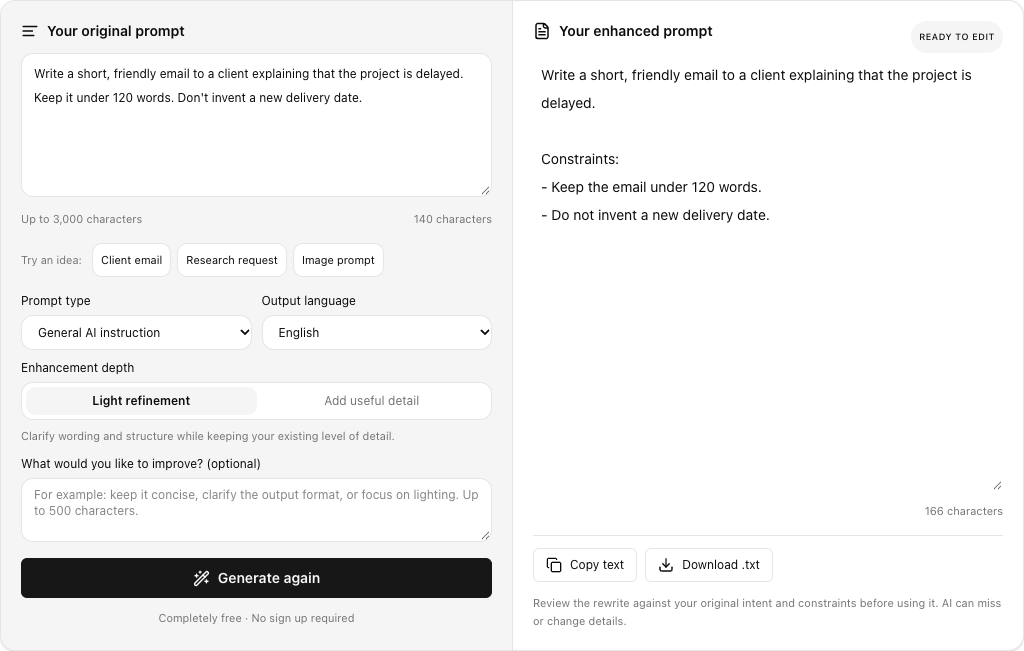
Follow this Prompt Enhancer workflow: start with a rough instruction, choose your settings and review the rewrite. This client-email example shows how light refinement can keep important constraints.
Start with your own prompt
Paste a draft instruction or image idea into the Prompt Enhancer, or load an example. Include the facts and limits you want to preserve.
Choose how to improve it
Set the Prompt Enhancer to general instructions or image generation. Choose light refinement or useful expansion, select an output language and add optional directions to focus the rewrite.
Review, edit and reuse
Compare the Prompt Enhancer result with your original. Correct anything that changes your meaning, then copy the prompt into your AI tool or download a text file.
See the Prompt Enhancer in Action
Compare rough prompts with illustrative Prompt Enhancer results. Load an example, adapt it to your task and choose when to generate your own rewrite.
A clearer client email request
This Prompt Enhancer example organizes the request while preserving the friendly tone, word limit and instruction not to invent a date.
Research with a checkable output
This Prompt Enhancer example keeps the table and source requirements. Unknown prices remain unknown instead of becoming invented facts.
Keep the subject and constraints
This Prompt Enhancer example preserves the black cat, single subject, windowsill, monochrome photography and exclusion of text.
Your original prompt
Write a short, friendly email to a client explaining that the project is delayed. Keep it under 120 words. Don't invent a new delivery date.
Prompt type
General AI instruction
Enhancement depth
Light refinement
This Prompt Enhancer example organizes the request while preserving the friendly tone, word limit and instruction not to invent a date.
Your enhanced prompt
Draft a friendly email of fewer than 120 words explaining a project delay to a client. Clearly state the delay and use a professional, considerate tone. Do not invent a revised delivery date; leave a placeholder if one is needed.
Illustrative before-and-after example. Your generated result will vary.
Your original prompt
Compare three project management tools for a small remote team. Use a table and cite sources. Don't invent prices.
Prompt type
General AI instruction
Enhancement depth
Light refinement
This Prompt Enhancer example keeps the table and source requirements. Unknown prices remain unknown instead of becoming invented facts.
Your enhanced prompt
Compare three project management tools for a small remote team in a table. Explain the differences relevant to remote collaboration and provide source links for factual claims. Include pricing only when it can be verified; mark unavailable prices as unknown.
Illustrative before-and-after example. Your generated result will vary.
Your original prompt
A single black cat sitting on a windowsill. Black-and-white photography. No text.
Prompt type
Image generation
Enhancement depth
Light refinement
This Prompt Enhancer example preserves the black cat, single subject, windowsill, monochrome photography and exclusion of text.
Your enhanced prompt
Black-and-white photograph of a single black cat sitting on a windowsill. Keep the image free of text.
Illustrative before-and-after example. Your generated result will vary.
A Prompt Optimizer for Your Next Task
Use the Prompt Enhancer to make everyday instructions more precise or refine visual ideas, while keeping the original request available for comparison.
Make everyday AI instructions clearer
The Prompt Enhancer organizes writing, research and planning requests around a goal, relevant context and desired format. Facts you have not supplied should remain placeholders.
Give image ideas a useful direction
For image ideas, the Prompt Enhancer keeps your subject, colors, quantities and exclusions. Detailed mode develops compatible lighting, composition or style where the original leaves room.
Optimize without making everything longer
Choose light refinement in the Prompt Enhancer to remove repetition and clarify phrasing. More detail is optional; a shorter, clearer instruction may be what you need.
Your original prompt
A single black cat sitting on a windowsill. Black-and-white photography. No text.
Prompt type
Image generation
Enhancement depth
Light refinement
This Prompt Enhancer example preserves the black cat, single subject, windowsill, monochrome photography and exclusion of text.
Your enhanced prompt
Black-and-white photograph of a single black cat sitting on a windowsill. Keep the image free of text.
Illustrative before-and-after example. Your generated result will vary.
Get More from Your Prompt Enhancer
A useful rewrite makes your intent easier to follow. Start with a real task, keep the facts visible and choose how much freedom the AI Prompt Enhancer should have. Review the final instructions before you reuse them.
Give the Tool a Goal to Preserve
Paste the prompt you already have, even if it is only a rough sentence. Include the subject, audience or task that matters. For an image prompt, specify important colors, quantities and exclusions. The prompt enhancer works with text; use Image to Prompt when your starting point is a reference picture.
Control the Prompt Enhancer’s Direction and Depth
Light refinement makes wording and structure clearer. For a fuller rewrite, choose Add useful detail in the Prompt Enhancer. Optional instructions can prioritize a shorter request, a clear table format or lighting that fits an image idea. Your stated goal should stay intact.
Review the Meaning Before Reuse
Compare names, numbers, negative instructions and output requirements with your original. A fluent Prompt Enhancer result can still omit a constraint. Keep unknown facts as placeholders, resolve conflicting requests and edit the result before giving it to another AI tool.
Use the Prompt Enhancer for General and Visual Tasks
For general instructions, the Prompt Enhancer focuses on the task, context, constraints and result format. For image generation, it keeps the subject and specified style while developing visual direction when requested. Switching purpose changes the rewrite’s focus; it does not run a different image generator.
Keep optimization useful and proportionate
The Prompt Enhancer also works as an AI Prompt Optimizer: a useful rewrite does not have to be longer. Extra adjectives, duplicated rules and unsupported promises can obscure your request. Keep details that help the task and remove anything that conflicts with your goal.
Retry the Prompt Enhancer Without Losing Your Draft
If the Prompt Enhancer request fails, your original prompt stays available for another attempt. Stop generation to review text received so far. Incomplete output is labeled, and available results remain editable, copyable and downloadable. Stopped or failed requests are not automatically retried.
Discover more tools
Start with an image, a video clip or a draft prompt. Pick the text you need next.
A Prompt Enhancer and a prompt optimizer both refine draft prompts. Enhancement can add useful missing detail; optimization can remove repetition, clarify ambiguity and organize the task. Choose light refinement for a restrained rewrite or add useful detail for a fuller version.
Yes. This AI Prompt Enhancer is free, with no login or sign up required. You can enhance, edit, copy and download your prompts.
The Prompt Enhancer is instructed to preserve your goal, subjects, quantities, exclusions and other explicit constraints. Missing factual details should remain placeholders rather than invented information. Review the result because AI can still change or miss a requirement.
Choose general instructions for writing, research and planning, or image generation for visual prompts. The Prompt Enhancer returns editable text to use with another AI tool. It does not run the rewritten task, generate images or guarantee another model’s output.
Ready to Try the Prompt Enhancer?
Use this free Prompt Enhancer to turn your draft into an editable prompt. Choose what needs work, then copy or download the result. No sign up required.